
There is a tendency to sign-up more frequently than before, but it is not a mandatory requirement in most cases. If you are looking for privacy or perhaps you have connected multiple accounts with your personal numbe.
Does Gmail REALLY need a phone number?
Google own process for creating an account uses a phone number primarily for three reasons: as a means to verify you are a real person, to provide a means of gaining access to your account in the event of its loss; and for two factor authentication in order to add additional security to your account.
There is no official maximum limit on phone-free sign-ups by Google, and a “Skip” button often presents at the phone number step, especially for mobile phones that have no strange activity. The availability of that choice will depend on a number of factors including your device, IP address and general account creation habits for that session.
How to Create a Gmail Account Without a Phone Number on Android
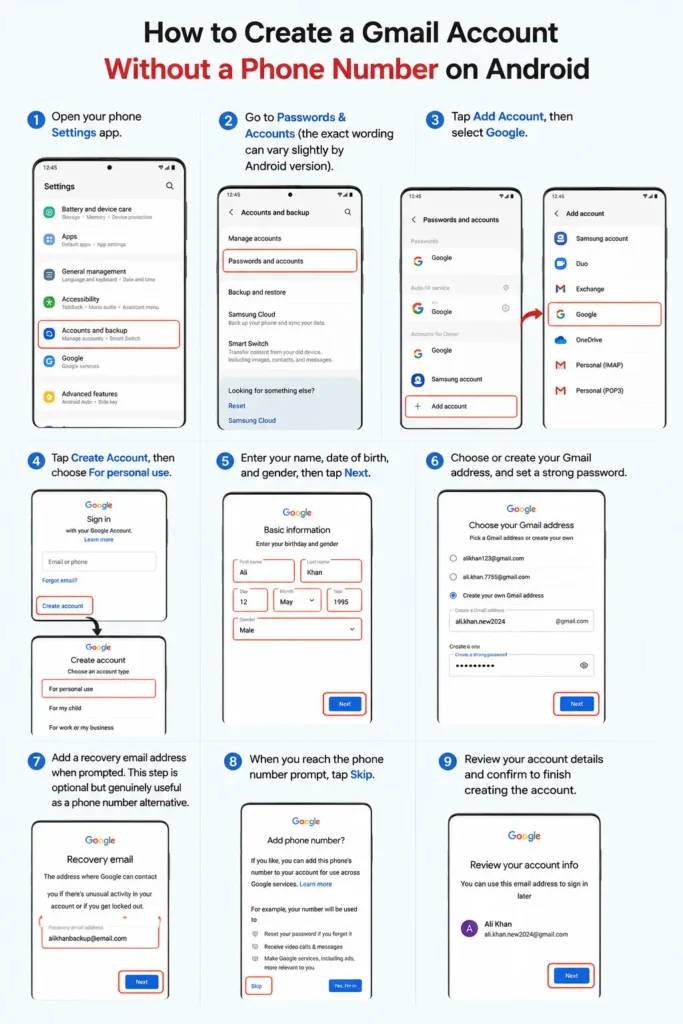
- Open your phone Settings app.
- Go to Passwords & Accounts (the exact wording can vary slightly by Android version).
- Tap Add Account, then select Google.
- Tap Create Account, then choose For personal use.
- Enter your name, date of birth, and gender, then tap Next.
- Choose or create your Gmail address, and set a strong password.
- Add a recovery email address when prompted. This step is optional but genuinely useful as a phone number alternative.
- When you reach the phone number prompt, tap Skip.
- Review your account details and confirm to finish creating the account.
How to Create a Gmail Account Without a Phone Number via the Gmail App
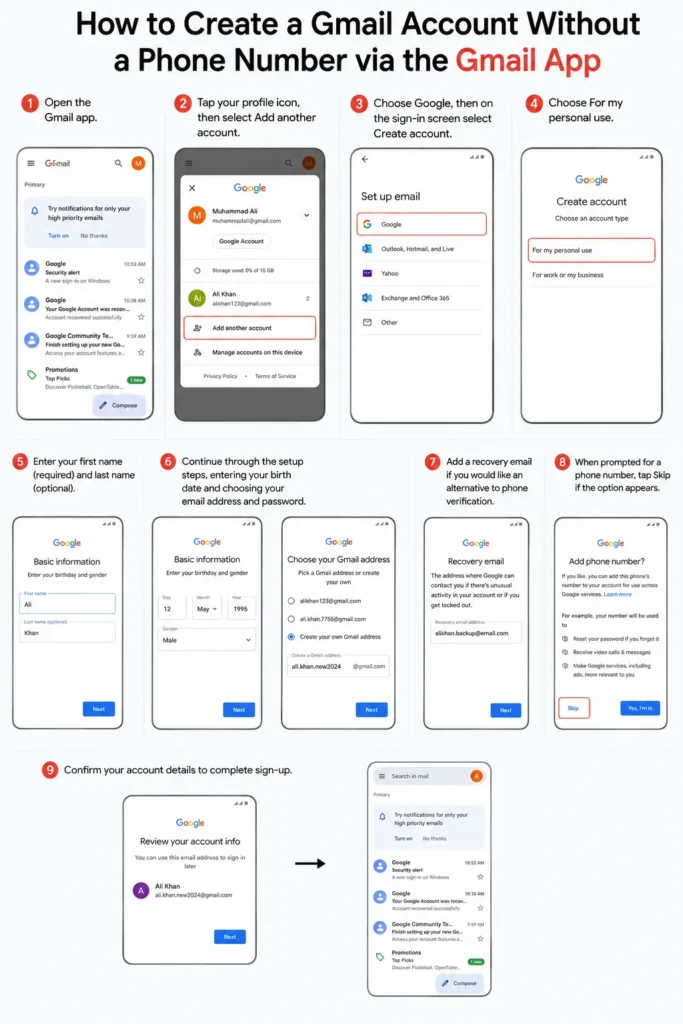
- Open the Gmail app.
- Tap your profile icon, then select Add another account.
- Choose Google, then on the sign-in screen select Create account.
- Choose For my personal use.
- Enter your first name (required) and last name (optional).
- Continue through the setup steps, entering your birth date and choosing your email address and password.
- Add a recovery email if you would like an alternative to phone verification.
- When prompted for a phone number, tap Skip if the option appears.
- Confirm your account details to complete sign-up.
Gmail verification process is slightly different from Google overall account sign-up process, and the number of times that “Skip” appeared when supplying a telephone number was a bit more consistent.
How to Create a Gmail Account Without a Phone Number on Desktop
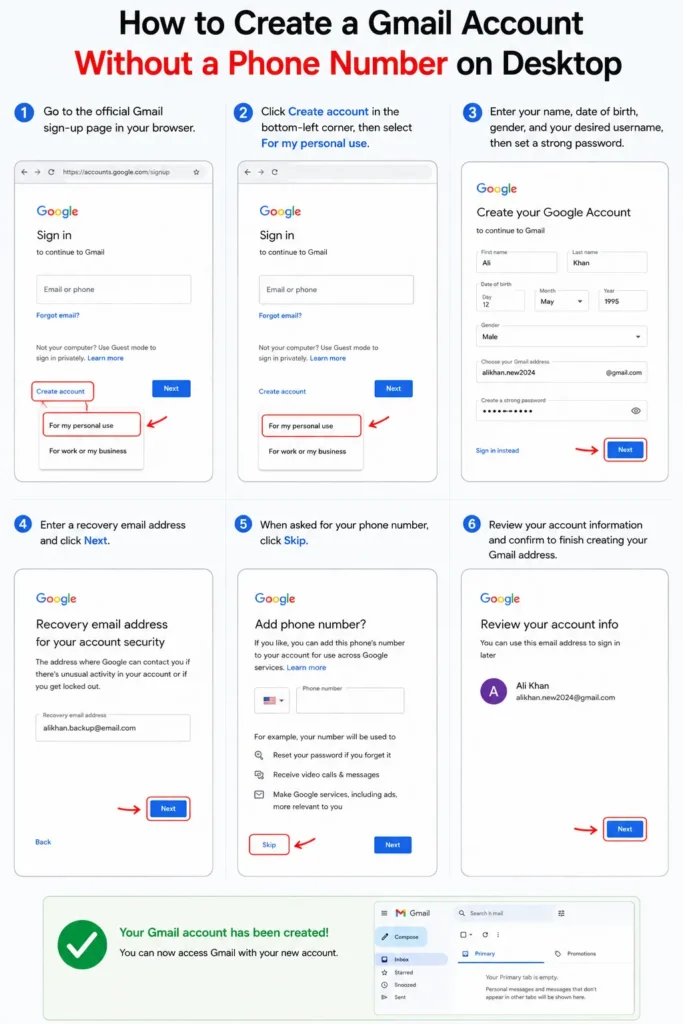
- Go to the official Gmail sign-up page in your browser.
- Click Create account in the bottom-left corner, then select For my personal use.
- Enter your name, date of birth, gender, and your desired username, then set a strong password.
- Enter a recovery email address and click Next.
- When asked for your phone number, click Skip.
- Review your account information and confirm to finish creating your Gmail address.
What to Do If You See a QR Code
Google may present a QR code verification step (usually on new sign-up flows) rather than prompting for a direct phone number. When scanning it with a trusted Google device, a notification and confirmation code are automatically generated. Once that verification is done, you will be directed to the phone number entry page, the Skip button will still be present.
If there is no skip option, you may be required to phone-verify for that specific sign-up attempt, if you don’t have access to a trusted device to scan the QR code.
Why the Skip Option Sometimes Doesn’t Appear
There are some things that may cause Google to be more serious about verifying your phone number on a particular sign up:
- Shared or previously flagged IP addresses, such as public Wi-Fi networks that have seen unusual account creation activity before.
- Creating multiple accounts in a short period from the same device or network.
- Signing up through certain browsers or incognito sessions, which can sometimes trigger stricter verification.
After hitting a wall on the first attempt, trying again later at the same time, with the same and different networks and/or different device makes the Skip option appear having it not been there before. Google verification guidelines are at its discretion and may change from session to session.
If You Genuinely Need to Keep a Number Private
If Google did require phone verification for the registration you would prefer to use a secondary number that is only used to register your account that you don’t use for anything else, like an eSIM plan or secondary sim, as oppose to outright going against Google fraud detection system. Note that if you need to use this number to recover your account in the future or for two factor authentication.
Frequently Asked Questions
Is it actually possible to make a Gmail account with no phone number?
Yes, in most cases. One of the most frequent options is a “Skip” when you are signing up via the Gmail app or a phone that has not seen before suspicious activity.
Why does Google ask for a phone number at all?
To verify you are a genuine individual as opposed to a web based bot, to provide an account recovery system, and to permit alternative two factor authentication.
What should I use instead of a phone number for account recovery?
No one is necessarily encouraged to add a recovery email address, it is the best alternative Google has provided.
Why did I get a QR code instead of a phone number prompt?
Google sign-up flows do not require entering a phone number as part of the sign-up process, or require entering a phone number as part of the process, but instead require the user to scan a QR code with a trusted device. Once completed, the Skip option for phone number should remain.