
Your NADRA family record is used for many important services, including passport applications, visa processing, inheritance matters, and updating personal information. It is important to ensure your family details are accurate and up to date.
NADRA provides official ways to verify your family record through its SMS service and digital identity services. In this guide, you’ll learn how to check your family tree, report incorrect information, and obtain a Family Registration Certificate (FRC).
Method 1: Verify Your NADRA Family Tree via SMS (8009)
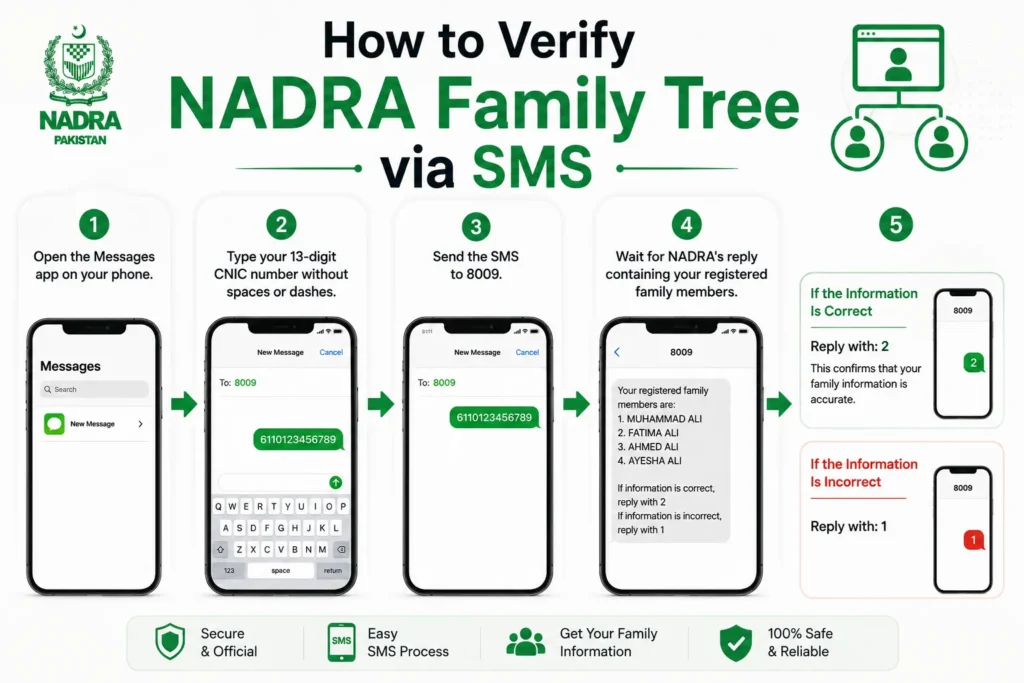
The quickest way to verify your family record is by using NADRA’s SMS verification service.
- Open the Messages app on your phone.
- Type your 13-digit CNIC number without spaces or dashes.
- Send the SMS to 8009.
- Wait for NADRA’s reply containing your registered family members.
If the Information Is Correct
Reply with: 2
This confirms that your family information is accurate.
If the Information Is Incorrect
Reply with: 1
NADRA may contact you for further verification and guide you through correcting your family record.
Method 2: Verify Your Family Record Online
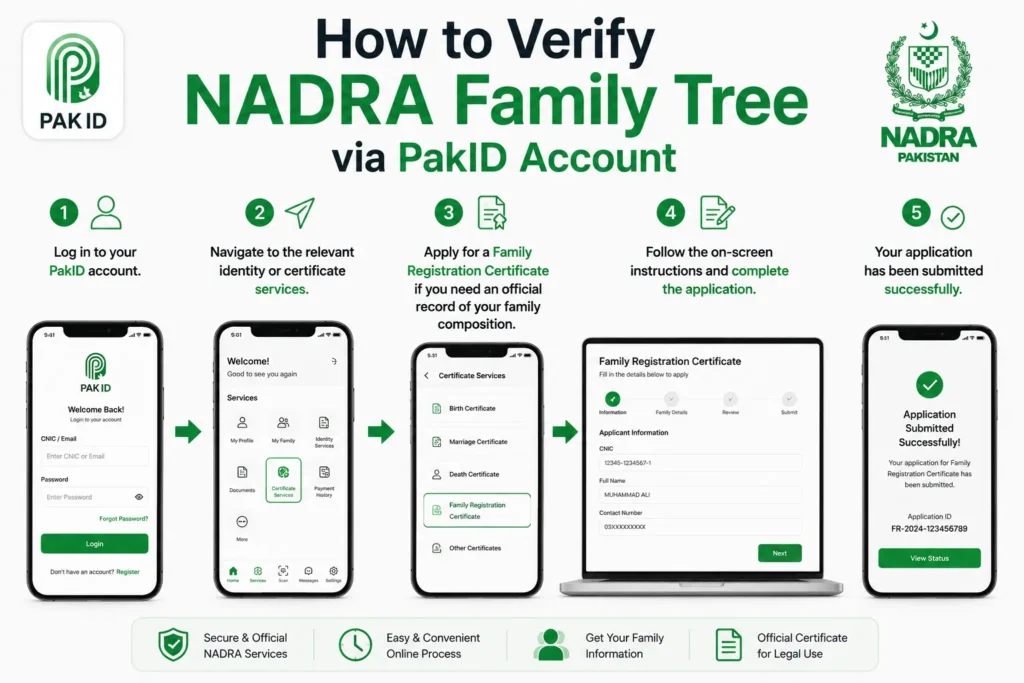
While the SMS service is intended for quick verification, you can also access NADRA’s digital services through the PakID platform to manage identity-related applications and request documents such as the Family Registration Certificate (FRC).
- Log in to your PakID account.
- Navigate to the relevant identity or certificate services.
- Apply for a Family Registration Certificate if you need an official record of your family composition.
- Follow the on-screen instructions and complete the application.
What Is a Family Registration Certificate (FRC)?
A Family Registration Certificate (FRC) is an official document issued by NADRA that shows your registered family composition.
- Visa applications
- Immigration
- Passport documentation
- Court proceedings
- Inheritance matters
- Government documentation
NADRA offers FRCs under different categories, including By Birth, By Marriage, By Adoption, and By All, depending on the relationships you need to document.
Comparison: SMS Verification vs. FRC
| Feature | SMS (8009) | Family Registration Certificate |
|---|---|---|
| Quick family verification | ✅ | ✅ |
| Official printable document | ❌ | ✅ |
| Used for visa and legal purposes | ❌ | ✅ |
| Shows registered family members | ✅ | ✅ |
| Requires application fee | SMS charges apply | Yes |
Why You Should Verify Your Family Record
Keeping your family record accurate helps avoid problems when applying for official services.
- Detect unregistered or incorrect family entries.
- Ensure accurate identity records.
- Simplify visa and immigration applications.
- Prevent delays in government services.
- Keep your NADRA information up to date.
Frequently Asked Questions
What is the NADRA SMS code for family verification?
The official NADRA family verification SMS code is 8009. Send your 13-digit CNIC number (without dashes) to receive your registered family details.
Can I verify my family tree online?
Yes. NADRA’s digital services and the PakID platform allow eligible users to access identity services and apply for a Family Registration Certificate.
What should I do if an unknown person appears in my family record?
Reply according to the instructions provided by the SMS service (for example, reporting incorrect information) and follow NADRA’s guidance to have your record reviewed.
Is the Family Registration Certificate the same as family verification?
No. The SMS service provides a quick verification of your registered family members, while the Family Registration Certificate is an official document that can be used for legal and administrative purposes.
Do I need an FRC for visa applications?
Many embassies and immigration authorities request an FRC as proof of family relationships. Requirements vary by country and visa type.