
Your Instagram grid would always display your posts in the same sequence from when you posted them, and pinning was the only way to get around it. Instagram officially launched Grid Reorder on June 8, 2026, and it will alter the level of control you have over your profile initial appearance.
Here is how it works, how to use it, and some ideas on how you can strategically rearrange your grid.
How To Reordering Your Instagram Grid: Step By Step
- Update Instagram application. It has been a gradual rollout, so keep up to date with the latest version from the App Store or Google Play.
- Then open your profile and access your “grid view”.
- Hold and drag any Reel or Post that you wish to drag. A pop-up menu will be displayed.
- You have the option to Pin to main grid and Archive, as well as the option to Reorder grid.
- Pull the post to the desired location. Can be moved anywhere in the grid, but not necessarily close to where it is now.
- Repeat the steps above for any other posts which you wish to move.
- Once finished, click on the back arrow in the top left corner. Your changes will immediately be visible to everyone who visits your profile.
There is an Undo option after you make a move to drag things back if you want to undo if something is amiss.
A Few Important Details
Mobile only
Currently, Grid Reorder is accessible only via the Instagram iOS and Android apps. You cannot reorder your grid right from Instagram on desktop.
Pinned posts do not move
Once you have pinned 3 or more posts to the top of your grid, they will remain at the top even if you rearrange all of your other posts.
No limit on how often you can reorder
You can move your posts as many times as you want and you can move as many posts.
A gradual rollout
In some cases, users were eligible from the beginning, and in others, the option came in a little later. If you have not seen “Reorder grid” yet, updating the app and checking again after a day or two should alleviate the problem.
How to use the pin vs. reorder controls
It is important to understand the interaction between these two features and not mistake them for one and the same.
| Feature | What It Does | Limit |
|---|---|---|
| Pin to main grid | Locks a specific post permanently at the very top | Up to 3 posts |
| Reorder grid | Freely moves any post to any position in the grid | No limit |
In reality, most will pin the two or three posts that they always want to be in the top two or three posts (such as a highlight reel or key announcement), and then reorder everything below it for the overall form of the posts.
How to Work with Grid Reorder
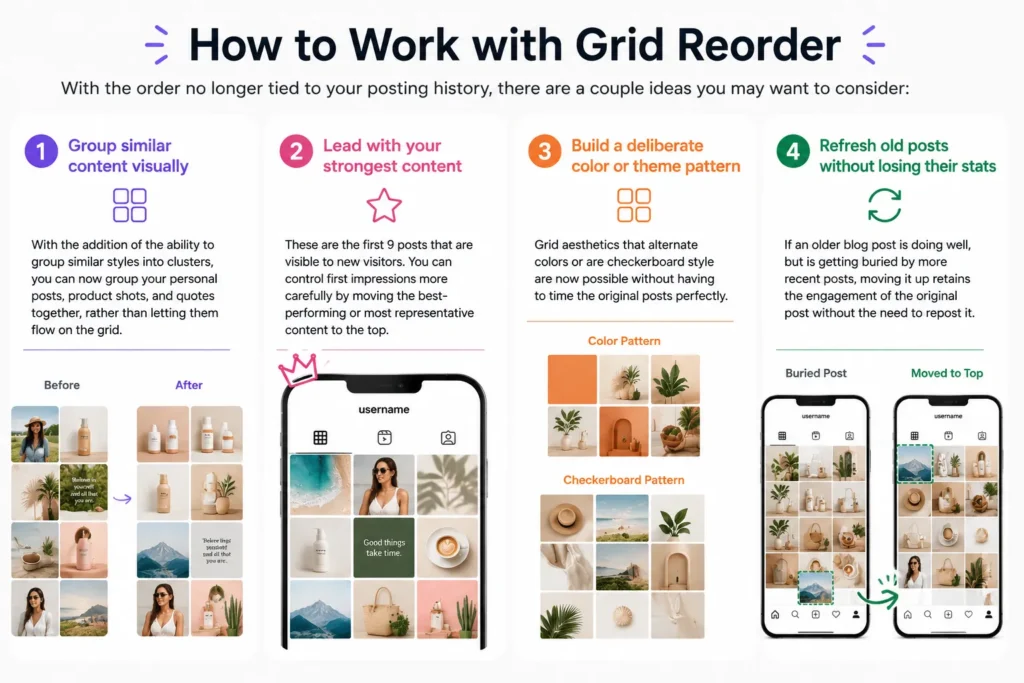
With the order no longer tied to your posting history, there are a couple ideas you may want to consider:
Group similar content visually
With the addition of the ability to group similar styles into clusters, you can now group your personal posts, product shots, and quotes together, rather than letting them flow on the grid.
Lead with your strongest content
These are the first 9 posts that are visible to new visitors. You can control first impressions more carefully by moving the best-performing or most representative content to the top.
Build a deliberate color or theme pattern
Grid aesthetics that alternate colors or are checkerboard style are now possible without having to time the original posts perfectly.
Refresh old posts without losing their stats
If an older blog post is doing well, but is getting buried by more recent posts, moving it up retains the engagement of the original post without the need to repost it.
Frequently Asked Questions
Does rearranging my grid change the post original date or engagement?
No. A re-order will only change the position of the post on your grid visually. Like, comments, and reach remain the same as the original publish date.
Can I reorder my Instagram grid on desktop?
Not currently. The Instagram mobile app for iOS and Android is the only place where Grid Reorder is available.
Is there a limit to how many posts I can reorder?
No, there is no cap. You can rearrange posts as many times and as many posts as you want.
What happens to my pinned posts when I use Grid Reorder?
Pinned posts will appear at the top of your posts grid until you remove them, even when you switch the order of the other posts.
Why don’t I see the “Reorder grid” option yet?
The feature was launched slowly from June 8, 2026. Ensure that your app is completely updated and then, check the option in a couple of days if it has not shown up.