
Close Menu
    Facebook X (Twitter) Instagram
    PakBeem
    Facebook X (Twitter) Instagram
    • Govt Schemes
    • How To
    • Jobs & Careers
    • Telecom
    • Travel
    • Automobile
    PakBeem
    Home»How To»How to Turn Exhibits into Immersive Videos with Dreamina Seedance
    How To

    How to Turn Exhibits into Immersive Videos with Dreamina Seedance

    mfaaizBy mfaaizJuly 16, 2026No Comments3 Mins Read
    Share Facebook Twitter Pinterest LinkedIn Tumblr Email
    Follow Us
    Google News Flipboard Threads
    how to turn exhibits into immersive videos with dreamina seedance
    Share
    Facebook Twitter LinkedIn Pinterest Email

    Static photos can only tell a small story. If you are presenting a museum exhibit, an art installation, a trade show booth, or a product display, you can add cinematic motion to make your content more engaging.

    Dreamina Seedance 2.0 4K is a powerful AI-based tool that enables you to animate still images into smooth high-resolution videos. Instead of spending hours learning professional editing software, you can create visually appealing videos in just a few steps.

    Why Turn Exhibits into AI Videos?

    Animated exhibit videos help capture attention and keep viewers engaged longer than static images.

    Some common use cases include:

    • Museum and historical exhibits
    • Art galleries
    • Product launches
    • Trade show displays
    • Educational presentations
    • Virtual exhibitions
    • Social media marketing
    • Online portfolios

    Benefits of Using Dreamina Seedance 2.0 4K

    Some of the key advantages include:

    • High-resolution 4K output
    • Smooth AI-generated camera movement
    • Realistic lighting and visual effects
    • Faster video creation
    • Beginner-friendly workflow
    • Professional-quality results

    How to Create an Exhibit Video
    how to turn exhibits into immersive videos with dreamina seedance

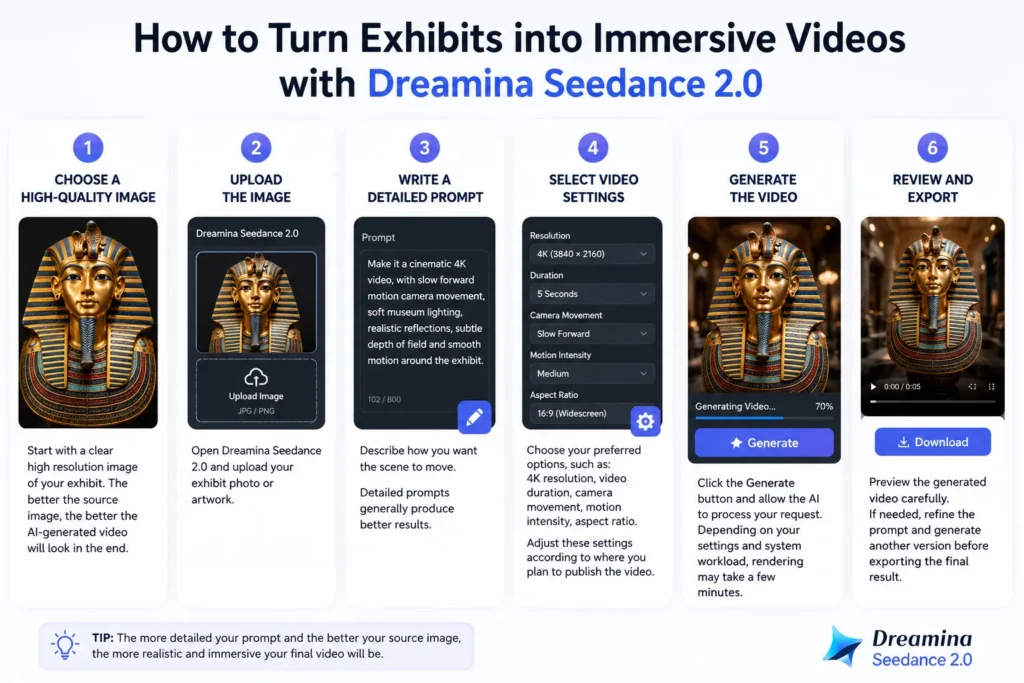
    Step 1: Choose a High-Quality Image

    Start with a clear high resolution image of your exhibit. The better the source image, the better the AI-generated video will look in the end.

    Step 2: Upload the Image

    Open Dreamina Seedance 2.0 and upload your exhibit photo or artwork.

    Step 3: Write a Detailed Prompt

    Describe how you want the scene to move.

    Example prompt:

    Make it a cinematic 4K video, with slow forward motion camera movement, soft museum lighting, realistic reflections, subtle depth of field and smooth motion around the exhibit.

    Detailed prompts generally produce better results.

    Step 4: Select Video Settings

    Choose your preferred options, such as:

    • 4K resolution
    • Video duration
    • Camera movement
    • Motion intensity
    • Aspect ratio

    Adjust these settings according to where you plan to publish the video.

    Step 5: Generate the Video

    Click the Generate button and allow the AI to process your request. Depending on your settings and system workload, rendering may take a few minutes.

    Step 6: Review and Export

    Preview the generated video carefully. If needed, refine the prompt and generate another version before exporting the final result.

    Make Better AI Videos

    To achieve more natural-looking results:

    • Use high-resolution images.
    • Avoid blurry source photos.
    • Write descriptive prompts.
    • Keep camera movements smooth.
    • Use realistic lighting descriptions.
    • Experiment with multiple prompt variations.

    Small prompt improvements often lead to noticeably better videos.

    Best Use For

    Dreamina Seedance 2.0 works well for:

    • Museum tours
    • Product showcases
    • Architecture visualization
    • Interior design presentations
    • Exhibition marketing
    • Educational content
    • Social media reels
    • YouTube videos

    Frequently Asked Questions

    Can Dreamina Seedance 2.0 generate videos from images?

    Yes It supports image-based AI video generation, allowing users to animate still images with realistic motion.

    Is 4K output supported?

    Dreamina Seedance 2.0 allows you to produce high-resolution videos including 4K, depending on your subscription plan and available features.

    Do I need video editing experience?

    No. The platform is designed to be beginner-friendly, making it suitable for users with little or no video editing experience.

    Can businesses use AI-generated exhibit videos?

    Yes. Businesses, museums, marketers, and creators can use AI-generated videos for presentations, promotional campaigns, and digital content, subject to the platform licensing terms.


    Related

    Share. Facebook Twitter Pinterest LinkedIn Tumblr Email
    mfaaiz
    • Website

    Related Posts

    How to Verify NADRA Family Tree Online and Via SMS in 2026

    July 13, 2026

    How to Check the NADRA ID Card Status in 2026

    July 13, 2026

    How to Make Money on Fiverr as a Beginner

    July 12, 2026
    Leave A Reply Cancel Reply

    Latest Posts

    How to Turn Exhibits into Immersive Videos with Dreamina Seedance

    July 16, 2026

    Electric Bike Brands in Pakistan – Prices & Features

    July 16, 2026

    Overseas Employment Corporation (OEC) Jobs 2026 for Domestic Workers – Apply Online

    July 16, 2026

    PESCO Jobs 2026 Apply Online – Latest Deputy Manager Finance & Legal Vacancies

    July 16, 2026

    Ufone Weekly Internet Plus 2026 – A Complete Package Details

    July 16, 2026
    Don't Miss

    PIA Buyers Receive Rs14.2 Billion in Properties Under Privatisation Deal

    mfaaizJuly 15, 2026

    Pakistan International Airlines (PIA) is continuing its privatisation process and the federal government has approved…

    Ufone Monthly Pakistan Package 2026 – 4000 Minutes & 400 MB

    July 13, 2026

    How to Verify NADRA Family Tree Online and Via SMS in 2026

    July 13, 2026
    About Us
    About Us

    PakBeam is a Pakistan focused website that provides reliable news, practical how to guides, government scheme updates, jobs and career information, telecom news, travel tips, and automobile content. Our goal is to make useful information simple, accurate, and easy to access for everyone.

    Email Us: info@pakbeam.com

    Facebook X (Twitter) Instagram Pinterest WhatsApp Threads
    Our Picks

    Cherry Blossom Hunza Tour 2026 – A Complete Travel Guide

    July 14, 2026

    Pakistan Railways Restores Bulleh Shah Passenger Train From July 17

    July 15, 2026

    Ufone Weekly Super Internet Package 2026 – 1.024 GB for Rs. 100

    July 15, 2026

    Electric Bike Brands in Pakistan – Prices & Features

    July 16, 2026
    Most Popular

    PIA Buyers Receive Rs14.2 Billion in Properties Under Privatisation Deal

    July 15, 2026

    How to Block Telenor Lost & Stolen SIM (Complete Step-by-Step Guide)

    July 12, 2026

    Punjab Agriculture Department Jobs 2026 for Agriculture Interns

    July 15, 2026

    Ufone Weekly Super Internet Package 2026 – 1.024 GB for Rs. 100

    July 15, 2026
    © 2026 PakBeam | All Rights Reserved
    • About Us
    • Contact Us
    • Privacy Policy
    • Disclaimer
    • Terms and Conditions

    Type above and press Enter to search. Press Esc to cancel.

    Loading Comments...