

Those looking for a simple “hide my Snapscore” switch, you are no longer required to look through Snapchat settings. It is not a bug but the current way of the app working.
Let’s get into the facts of what is really happening with Snapscore privacy and the actual steps that do help to limit who can view it.
Does Snapchat Hide Your Snapscore?
There is not a global privacy toggle, a custom audience selector, or built-in setting to obscure your Snapscore from all people around the world. You can check out your current Snapscore by visiting your profile page, which anyone you are linked with will be able to see.
It is important to clarify as there are various websites with contradicting information, some have a “Snap Score” option that is hidden in the privacy settings. In terms of the actual implementation, there is no direct control at this time in the app. The only real gate between you and your score is who can be considered a “friend” anyway, so limit that.
How to Hide Your Snapscore From a Specific Person
If you have someone in particular you don’t want to be at your fingertips, here are the two sensible choices.
Option 1: Remove Them as a Friend
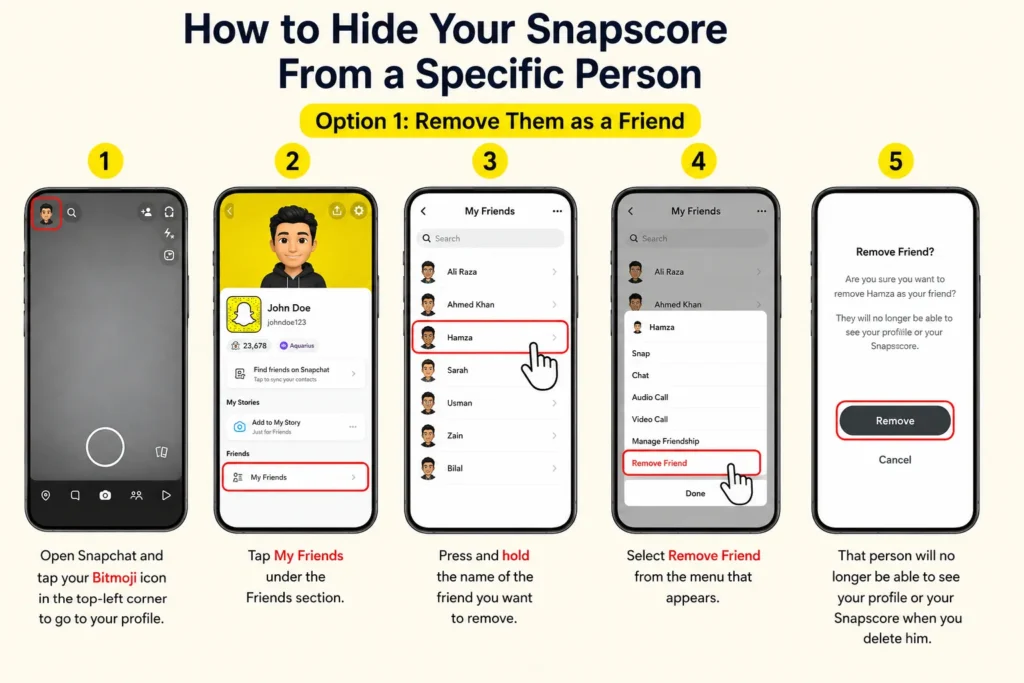
- Open Snapchat and tap your Bitmoji icon in the top-left corner to go to your profile.
- Tap My Friends under the Friends section.
- Press and hold the name of the friend you want to remove.
- Select Remove Friend from the menu that appears.
That person will no longer be able to see your profile or your Snap score when you delete him.
Choose 2: Block Them Completely
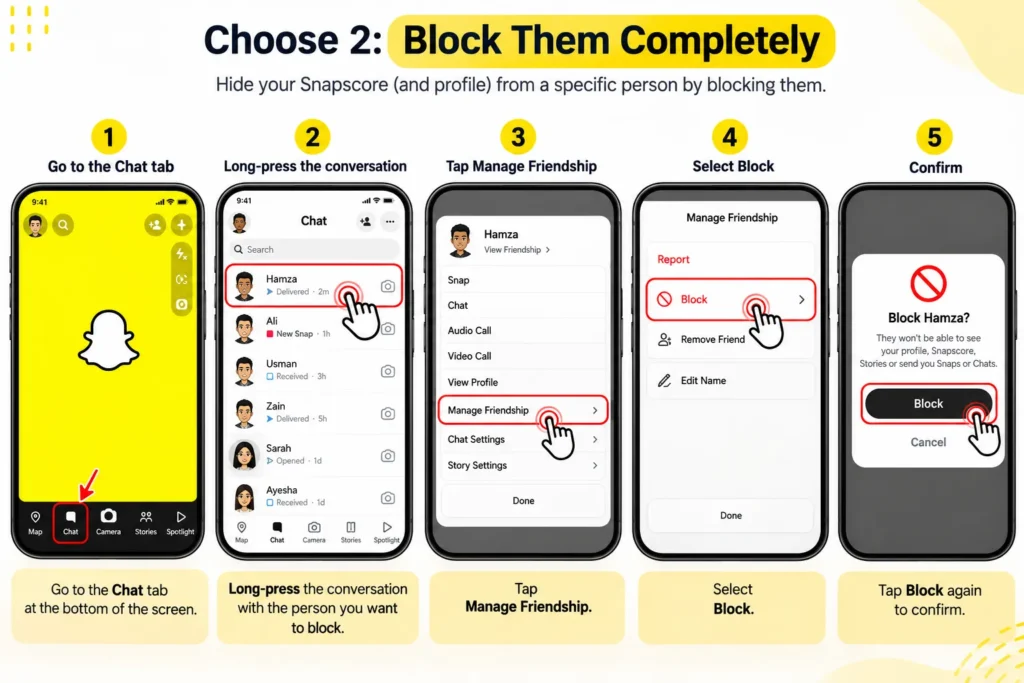
- Go to the Chat tab at the bottom of the screen.
- Long-press the conversation with the person you want to block.
- Tap Manage Friendship.
- Select Block, then confirm.
Blocking is the better one as it also removes you from that person view of your Story and prevents them from seeing you or your profile in the future. The downside is that it entirely denies communication, which is not always a desired effect if you want to avoid one type of attention, not the relationship.
How to Hide Your Snapscore From Strangers
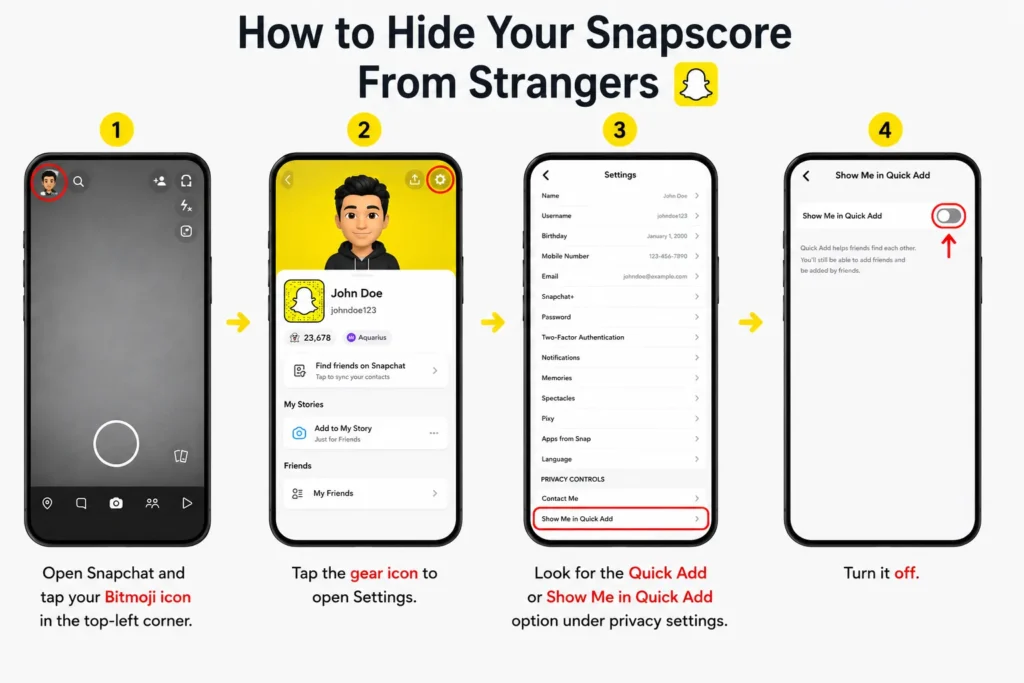
Your profile can also be seen by people who are not your “friends” (but may be by using the Snapchat “Quick Add” function that recommends accounts to new potential “friends”). If you are in the list, a public version of your profile will appear to non-interacting people and will include your Snapscore.
To prevent this:
- Open Snapchat and tap your Bitmoji icon in the top-left corner.
- Tap the gear icon to open Settings.
- Look for the Quick Add or Show Me in Quick Add option under privacy settings.
- Turn it off.
It will not prevent you from showing your score to friends that you have, but it will prevent your profile from being picked up by people that have not added you.
Privacy Settings Worth Adjusting
There is no separate Snapscore toggle, but selecting a couple of relevant settings to tighten up can make a significant difference to the overall feel of your activity:
- Contact Me: Set this to “Friends” or “Friends and Contacts” rather than “Everyone” to control who can message you in the first place.
- View My Story: Restrict this to “My Friends” so your activity is not visible to a wider audience than intended.
- Who Can See My Location: Check this one separately, as it is a related, but different, privacy issue from your Snapscore.
Frequently Asked Questions
Can I hide my Snapscore from everyone at once?
No. At this time, there is no way to globally hide your Snapscore. It is still accessible to anybody who has you as a common friend.
Will removing a friend hide my Snapscore from them immediately?
Yes. After unfollowing a person, they will not be able to see your profile or your Snapscore until you follow them back.
Does blocking someone also hide my Snapscore from them?
Yes, and not because you can’t unfriend them anymore – blocking means that they can’t view your Story or send you snaps.
Can strangers see my Snapscore even if we are not friends?
Generally no, but if you are in the Snapchat “Quick Add” list, then yes. This is prevented by setting your privacy settings to “Show Me in Quick Add”.