
If you have recently tried using Telegram on a Pakistani mobile network and have been greeted with a spinning wheel, you are not in any way wrong. It has been network blocked for years and that is not likely to shift.
Fortunately, it is possible to use Telegram from Pakistan. All you need to know is why it is blocked, what you have to do and how you can get into it without compromising your device or data.
Is Telegram Banned in Pakistan in 2026?
Yes. Telegram is banned by all major ISPs and mobile networks in Pakistan. This is not a new development. PTA had earlier blocked the app in 2017 and some time later the restriction on the app was lifted, it has never been completely removed.
Network level are on a regular Pakistani internet connection, whether it is your mobile internet plan or home broadband line, this restriction simply won’t be there.
Why Did PTA Block Telegram?
The official reasoning centers on a few recurring concerns:
- Encryption and content moderation – Telegram robust end-to-end encryption system makes it challenging for regulators to monitor or moderate content on the platform.
- Non-compliance with local regulations – Telegram has not completely met PTA’s standards regarding data access and takedown requests.
- National security concerns – Police have raised fears that the app can be used to share illegal material or organise activities that are not under their control.
Unlike some platform bans, where the ban is officially announced and has a fixed timeframe, Telegram status in Pakistan has never been officially announced and has no set time frame, making it more confusing over the years.
Is It Legal to Use a VPN to Access Telegram in Pakistan?
VPNs are not illegal in Pakistan, they are in other countries. VPNs are popular among businesses, freelancers, and remote workers, and PTA has been comfortable with VPNs being used by peoples to access a blocked, but otherwise legal, service.
That said, keep these points in mind:
- Using a VPN to access Telegram for personal communication, business, or media consumption is a low-risk, common practice.
- Using a VPN to access or share content that illegal under Pakistani law (extremist material, fraud, or similar) remains prohibited regardless of the app.
- PTA registration requirements for VPNs have existed for corporate and institutional use, though enforcement against individual personal VPN use has been inconsistent.
If you are sending a message to family, running a business channel or attending a study group, you are in the same boat as millions of other Pakistanis daily who use a trusted VPN to access Telegram.
How to Use Telegram in Pakistan: Step-by-Step
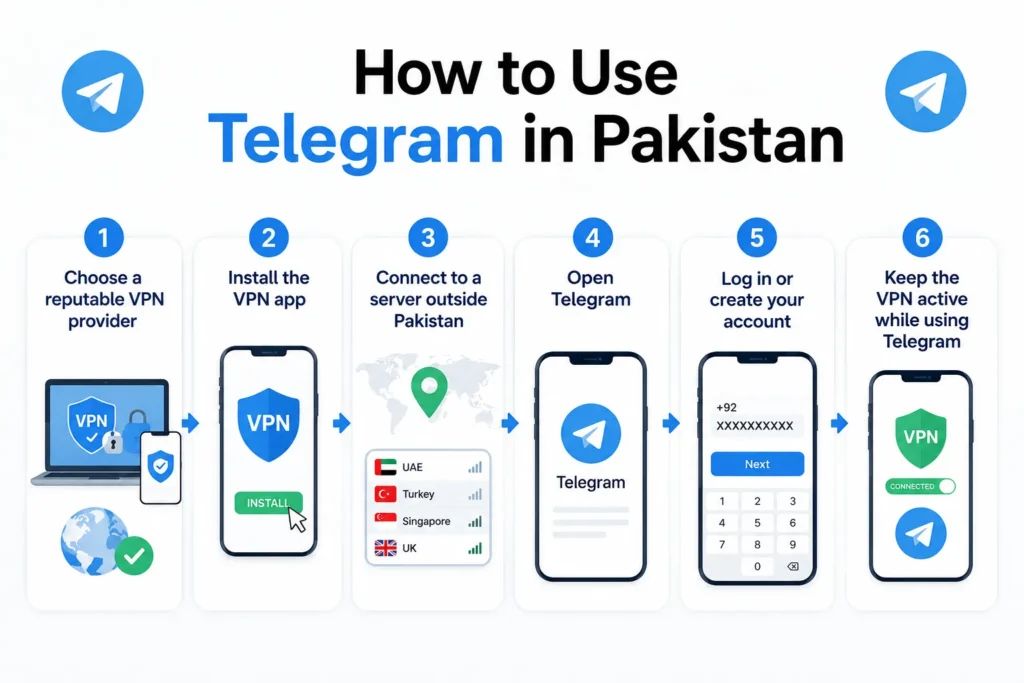
Here is the reliable method most users rely on today.
Choose a reputable VPN provider
Look for one with a no-logs policy, strong encryption standards, and servers optimized for messaging apps. Free VPNs are generally riskier since many log user data or inject ads.
Install the VPN app
Your phone or computer from the provider’s official website or your app store.
Connect to a server outside Pakistan
Connect to a server outside Pakistan. Servers in nearby countries or ones optimized for low latency tend to give you a faster, more stable connection for messaging.
Open Telegram
Once the VPN connection is active. If you do not already have the app installed, it directly from the Google Play Store, Apple App Store, or Telegram official website while connected to the VPN.
Log in or create your account
Using your phone number for verification.
Keep the VPN active
If using Telegram, since disconnecting will likely cause the app to lose connection again.
Choose a Safe VPN for Telegram
Not all VPNs are equal, and using the wrong one can expose your data instead of protecting it. When picking one, prioritize:
- A clear no-logs policy, ideally backed by independent audits
- Strong encryption protocols (look for OpenVPN or WireGuard support)
- A kill switch feature, which cuts your internet if the VPN connection drops, so your real IP is not accidentally exposed
- Reasonable speed and server count, since slow VPNs make voice calls and media sharing on Telegram frustrating
- A clear refund or trial policy, so you can test reliability before committing
Avoid unknown free VPN apps with no clear privacy policy. Several have been found bundling data-harvesting practices or unwanted ad injections, which defeats the purpose of using a VPN in the first place.
What If You would Rather Not Use a VPN?
If dealing with a VPN feels like more hassle than it’s worth, you do have alternatives, though none replace Telegram exactly.
| App | What It’s Good For |
|---|---|
| Widely used in Pakistan, works without a VPN, strong for personal and small business messaging | |
| Signal | Privacy-focused alternative with end-to-end encryption by default |
| Discord | Better suited for community and group-based communication, not typically blocked |
Frequently Asked Questions
Is Telegram completely blocked in Pakistan in 2026?
Yes, Telegram remains blocked at the network level across major ISPs and mobile carriers in Pakistan, a restriction that has been in different place.
Do I need a VPN to use Telegram in Pakistan?
Yes. Without a VPN or similar circumvention tool, Telegram generally won’t connect on a standard Pakistani internet connection.
Is using a VPN in Pakistan illegal?
No, personal VPN use itself is not illegal in Pakistan and is commonly used to access blocked but lawful services. Using a VPN to access or distribute illegal content remains against the law regardless of the tool used.